

This guide demonstrates how to use the Dynamic Routes module in FreePBX (specifically versions 16 and 17) to create a sequential “traffic cop” system. It will inspect the Caller ID of an incoming call on a specific DID, intercept any anonymous, hidden, or restricted numbers, pass the remaining calls through a Toll-Free number check, and finally deliver regular callers to your standard destination—all while keeping your Inbound Routes GUI perfectly clean.
If you want to cleanly route specific incoming caller IDs—such as capturing all toll-free numbers or blocking anonymous callers—without creating dozens of messy inbound routes, standard FreePBX pattern matching falls short. Because standard inbound routes use basic digit matching, trying to catch toll-free prefixes (like 800, 888, etc.) can accidentally misroute calls from geographic area codes (like 808 for Hawaii or 858 for California).
Prerequisites
Before beginning, ensure your FreePBX system has the Dynamic Routes module installed.
- Navigate to Admin > Module Admin.
- Check for Dynamic Routes. If it is not installed, download and install it.
Step 1: Create the Anonymous Caller ID Filter
This first Dynamic Route will check if the incoming caller ID is blank, or if the SIP provider has replaced the number with words like “Anonymous,” “Restricted,” or “Private.”
- Navigate to Applications > Dynamic Routes.
- Click Add and name the route (e.g.,
Anonymous_CID_Check). - Set the Source Type to
Asterisk Variable. - In the Asterisk Variable field, enter the following regex string:
${REGEX("^([Aa]nonymous|[Uu]nknown|[Rr]estricted|[Pp]rivate|[Hh]idden)?$" ${CALLERID(num)})}
- Scroll down to the Routing section at the bottom. Click to add a new match entry.
- In the Match field, type exactly:
1 - Set the Destination next to it to how you want to handle blocked callers (e.g., Terminate Call > Hangup, or an IVR explaining you don’t accept blocked numbers).
- Set the Default Destination below that to Dynamic Routes >
TollFree_CID_Check(we will create this in the next step). - Click Submit.
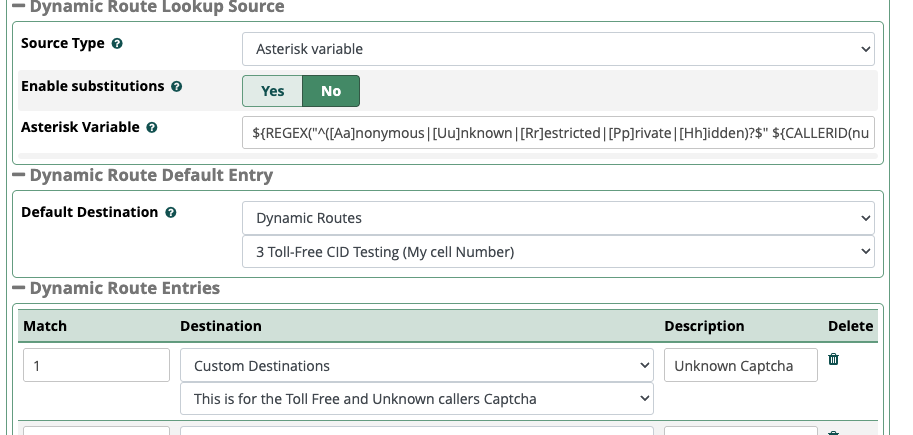
How it works: The Asterisk
REGEX()function evaluates the caller ID. If it matches common hidden caller ID terms (ignoring case sensitivity) or is completely blank, it outputs a1and routes the call to your termination destination. If it contains a real number, it outputs a0and falls through to the Default Destination.
Step 2: Create the Toll-Free Caller ID Filter
This second Dynamic Route receives the calls that passed the first check and inspects them for North American toll-free area codes (800, 833, 844, 855, 866, 877, 888) across 10-digit, 11-digit, and E.164 (+1) formats.
- In Applications > Dynamic Routes, click Add to create another route.
- Name it
TollFree_CID_Check. - Set the Source Type to
Asterisk Variable. - In the Asterisk Variable field, enter the following regex string:
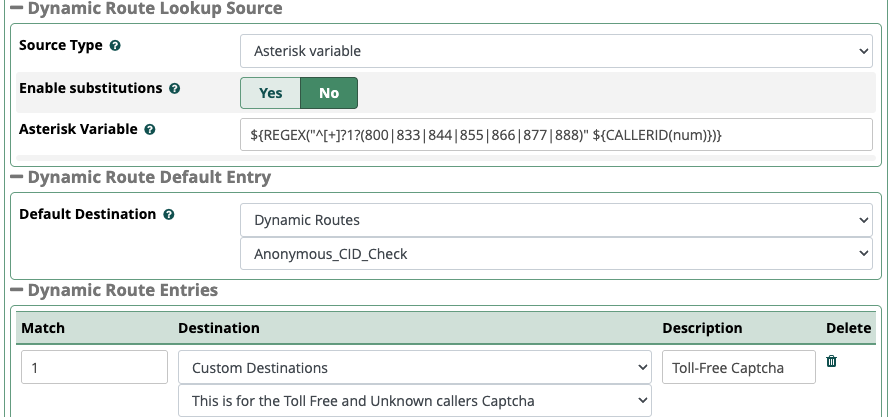
${REGEX("^[+]?1?(800|833|844|855|866|877|888)" ${CALLERID(num)})}
- Scroll down to the Routing section and add a new match entry.
- In the Match field, type exactly:
1 - Set the Destination next to it to your special destination for Toll-Free callers.
- Set the Default Destination below that to your standard inbound PBX destination (e.g., your main IVR, Ring Group, or Queue).
- Click Submit and then Apply Config.
Step 3: Link Your DID to the Front Door
Now that your filters are built and chained together, you simply need to point your specific incoming DID to the first step in the chain.
- Navigate to Connectivity > Inbound Routes.
- Click Add Inbound Route (or edit your existing route for the desired DID).
- In the DID Number field, enter your specific DID (e.g.,
5874096407).
- Note: If your SIP provider requires a specific format, ensure it matches (e.g.,
15874096407or+15874096407). Do not use an underscore_unless you are actively using Asterisk pattern matching for a range of DIDs.
- Leave the CallerID Number field blank.
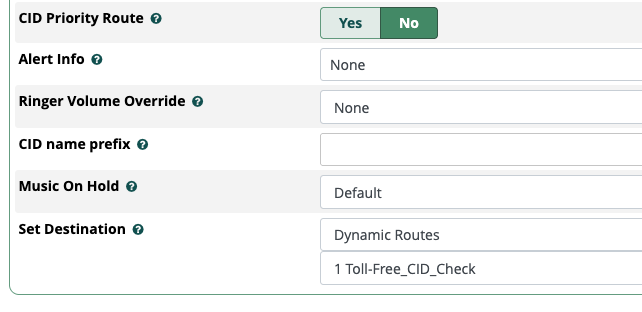
- Scroll to the bottom to the Set Destination section.
- Choose Dynamic Routes and select
Anonymous_CID_Check. - Click Submit and Apply Config.
The Final Call Flow
Your system now processes incoming calls on that DID with a highly efficient, automated gatekeeper:
- The Inbound Route acts as the front door. It verifies the call is for your specific DID and hands it to the Anonymous route. (Calls to other DIDs bypass this logic entirely).
- The Anonymous Filter checks for blocked or blank numbers, hanging them up if matched, or passing them to the next step if they are legitimate numbers.
- The Toll-Free Filter checks the remaining calls for toll-free prefixes. Matches are sent to your special toll-free destination, while all standard geographic numbers drop safely into your normal PBX routing.